Built by a PACS admin, for PACS admins.

Why does it look wrong, where did it go, who saw it, will the new scanner work on Monday. RadFuzion is a DICOM router with the tools to answer the questions you get every day, and to fix what they find.

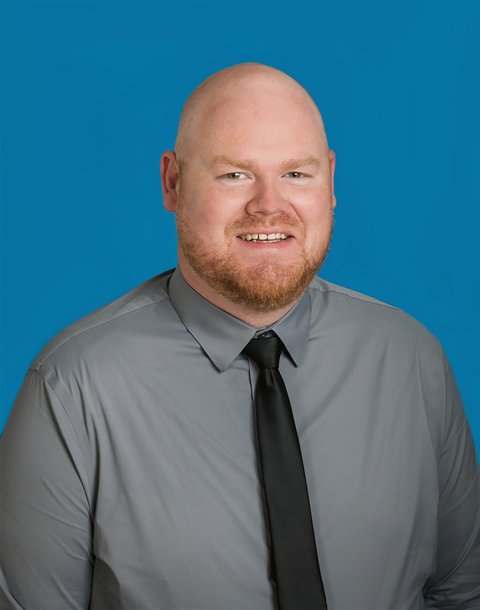
Mark Jones
“I've been the PACS admin, the network engineer and the HL7 engineer for a teleradiology practice since 2010. These are the checks I've done by hand for years. Now they're one click.”
Mark Jones, Co-Founder & CEO, RadFuzion

Built by a PACS admin

Since 2010, the same questions from radiologists, techs and vendors. Now they’re tools that answer them in a click.

On your server

Windows or Linux, on site or in your cloud. The images and the logs stay with you, and every request is checked against the user’s role.

Fix it, don’t just find it

Edit the tags, resend through the right rule, black out the burned-in name, hold an exam until it’s right: from the same screen that showed you the problem.

And what in RadFuzion answers them

Is the problem in the images, or in the PACS?

Open the exam in the viewer and Inspect reads every header and says what’s wrong in plain words: missing slices, a tilted image, another patient’s image in the series, two images with one UID. Check Exam does the whole exam against the DICOM standard’s rules for each kind of object, and Compare with Archive puts RadFuzion’s copy beside the archive’s, image by image.

See Inspect in the viewer
  • InspectCheck, Compare, Validate, Display, Changes and Trail, beside the images
  • Check Exam…every series and image, with a report you can send the vendor
  • Compare with Archive…images on one side only, tags and pixels that differ
Where did the study go?

Every exam shows where it came from (AE title, address, time), which rules it matched, each destination and how far it got. Unified Logs tells the story of one accession end to end, Routing Decisions shows why each rule did or didn’t match, and Test Rules runs your rules against an exam without sending anything. With storage commitment, the destination confirms what it actually kept.

  • Transferseach destination’s progress, live
  • Unified Logsone accession, every event
  • Test Rulesa dry run of the rules on any exam

Can you send it again, to the right place this time?

Resend sends an exam again. Resend with Rule forces an exam through a rule you pick, with that rule’s conversions and changes, when it was sent to the wrong place. When a destination goes down, exams wait for it and go out the moment it’s back, instead of failing overnight. One image a PACS won’t take fails on its own, with the reason, and the rest are delivered.

  • Resend with Rule…any rule, regardless of its conditions
  • Down destinationsexams held, then sent when it reconnects

The patient’s name or MRN is wrong. Can you fix it?

The Tag Editor finds an exam on a PACS, a cloud store or Local Storage, corrects it and sends it back, or replaces the study there. Exams held for missing tags are fixed and released from Transfers. HL7 patient updates (ADT) correct exams that haven’t gone out yet, keeping the old values in each image’s Original Attributes.

  • Tag Editoredit, push or replace a study
  • Fix Tagsexams held for missing patient tags
  • Merge / Splitstudies filed together or apart by mistake

Is there patient information burned into the pixels?

Find Burned-In Text reads the text on each image (ultrasound banners, scanned paperwork, screen captures), marks what looks like a name, ID or date, and makes a copy with it blacked out after you review it, to download or send to a destination. De-identification profiles clean the headers on the way out, and a de-identified copy of an image can go to a vendor ticket.

  • Find Burned-In Text…free add-on, runs on your server
  • AnonymizationDICOM PS3.15 Basic Profile and your own profiles

Who looked at that exam?

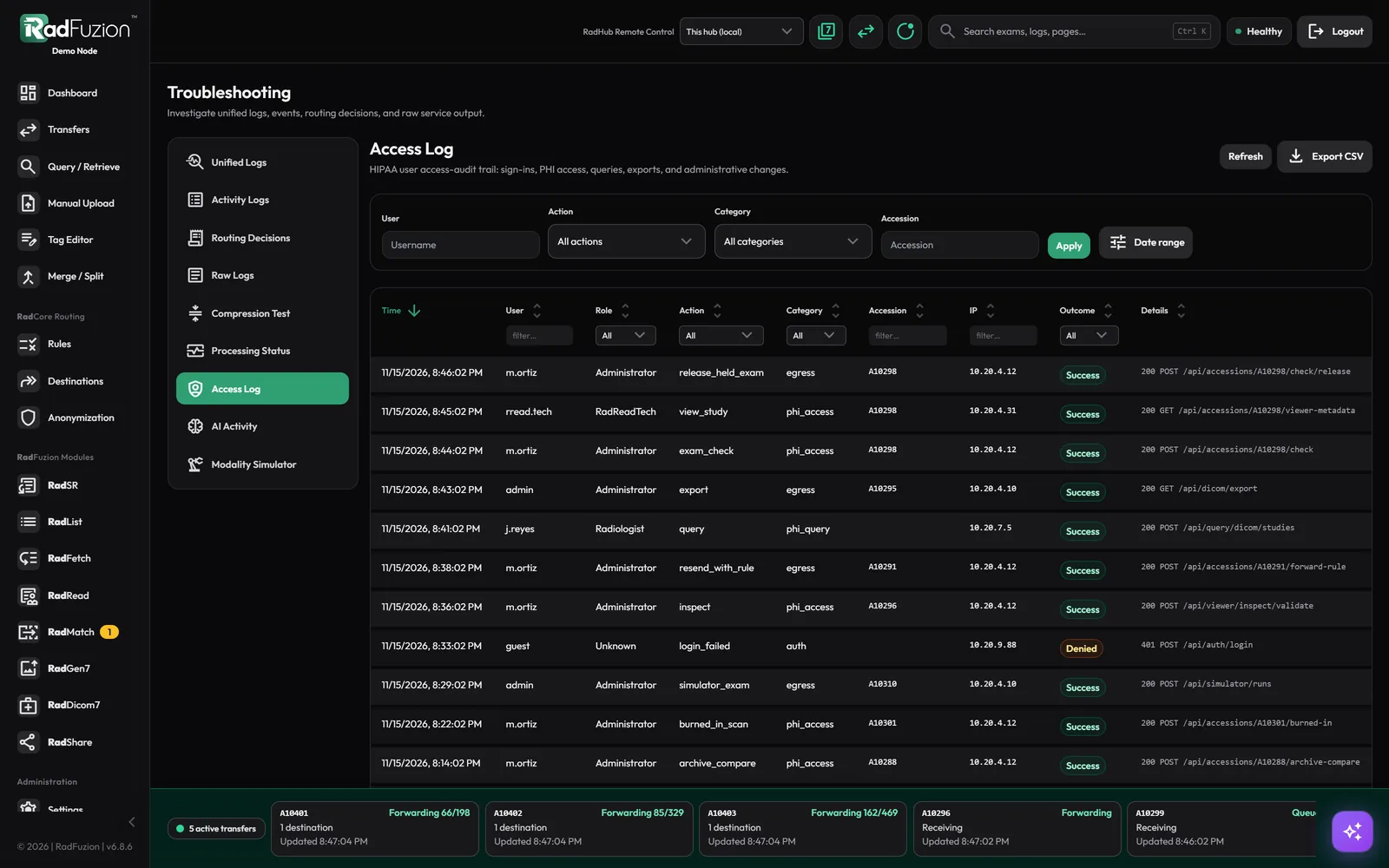
The Access Log records who opened, searched, exported, sent and changed what, and can go to your SIEM over Syslog, as plain JSON or IHE ATNA. Every role sees only what its permissions allow, and every request to the server is checked against them.

  • Access Logthe HIPAA access trail, with its own retention
  • SyslogTLS, TCP or UDP, JSON or IHE ATNA

Is the new scanner going to work on day one?

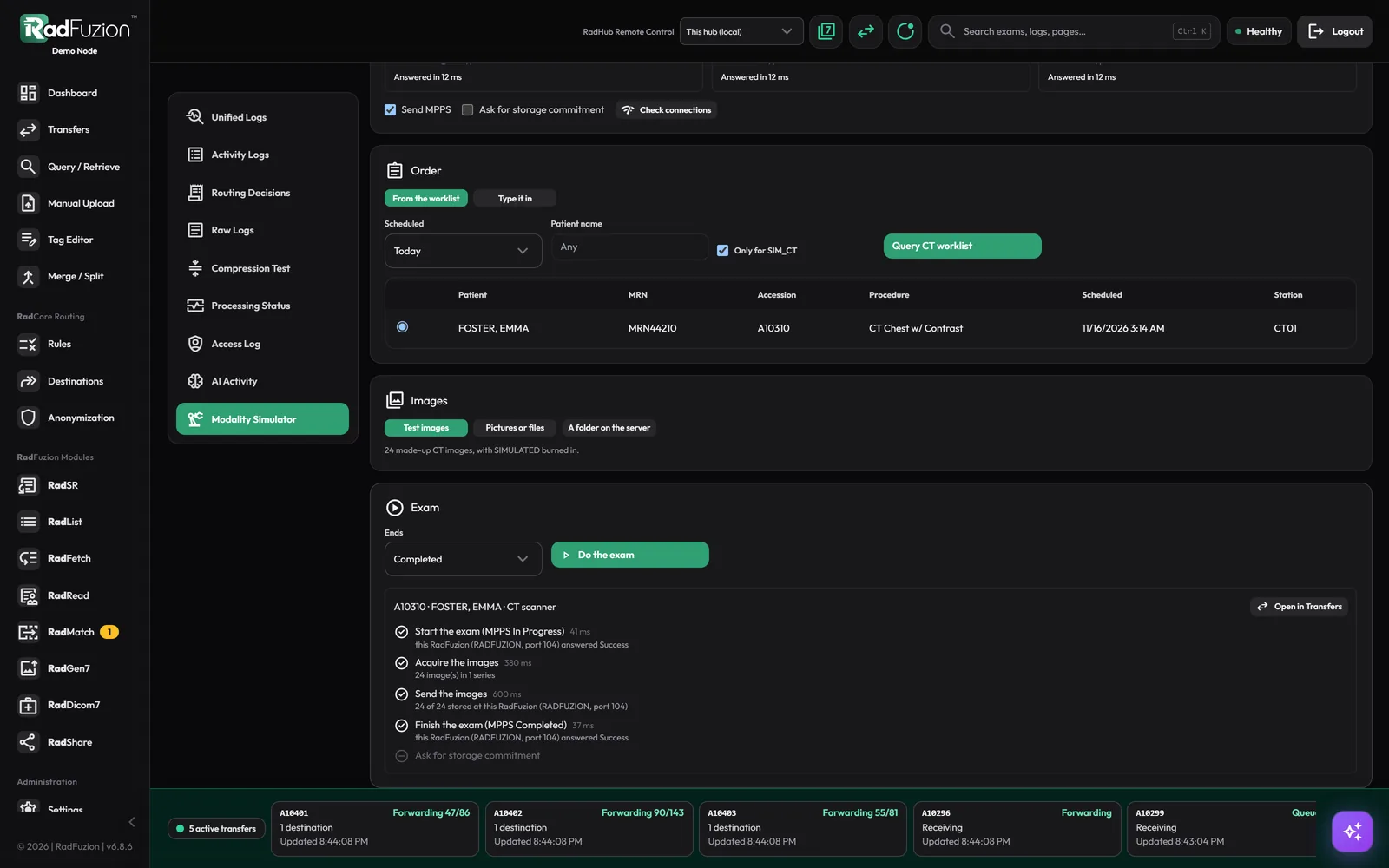
The Modality Simulator acts like a scanner: it queries the worklist, starts the exam with MPPS, sends test images under the order’s patient and accession, finishes it, and asks for storage commitment, showing what the other side answered at each step. Try RadFuzion or the PACS behind it before the vendor’s engineer arrives.

  • Modality SimulatorX-ray, CT, MR, US, mammo, NM, PET; your own setups
  • Modality Worklist + MPPSfrom your HL7 orders

What are the workstations pulling, and from where?

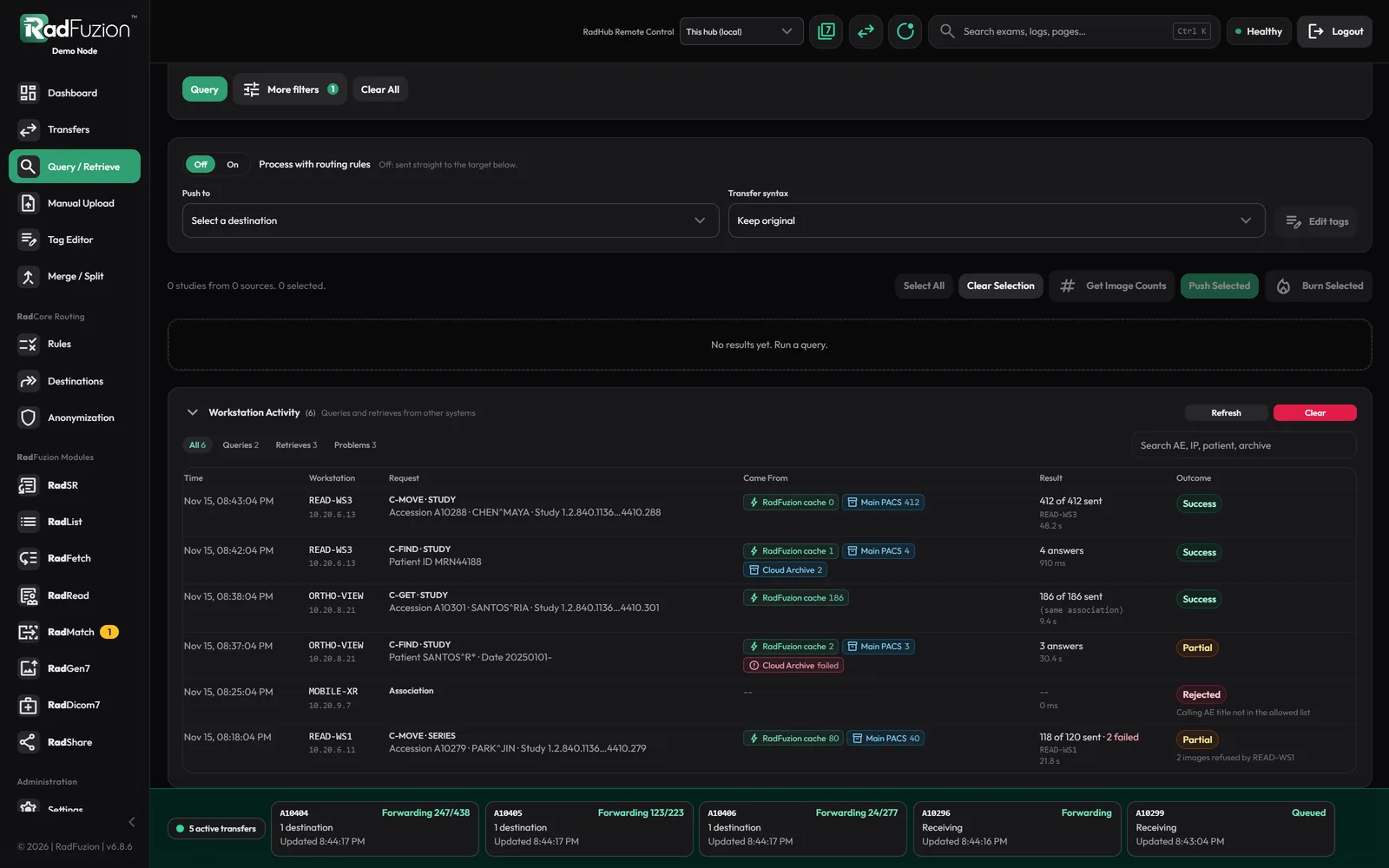
Workstations can query RadFuzion and get answers from its image cache and your archives together; what only an archive has is pulled on request. Workstation Activity lists every search and retrieve: who asked, what for, how many answers came from where, and what was sent.

  • Query / Retrieveone AE in front of the cache and your archives
  • Workstation Activitysearches, pulls, refusals

Will one bad file take routing down?

No. Compressed images are decoded in separate worker processes, so a damaged one fails alone and routing carries on. Setup checks tell you when a rule won’t run because a setting it needs is off, and notifications reach you by email, Slack, Google Chat or a webhook before the radiologists do.

  • Needs attentionstuck forwards and failed jobs, one click to retry
  • Setup checkswhat won’t run, and the setting that fixes it

What it looks like

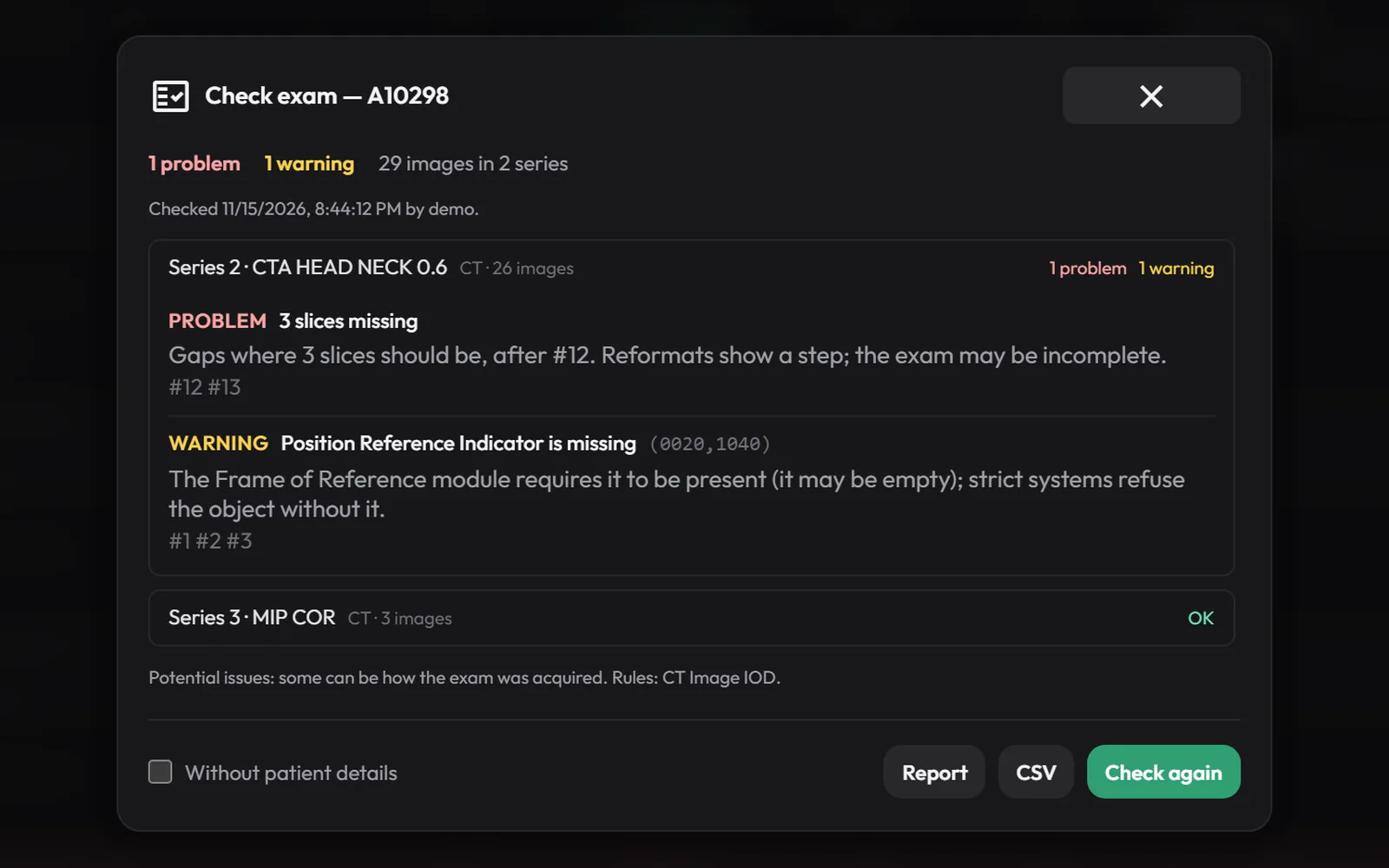
Check Exam report for a made-up CTA exam: three slices missing in one series, a missing Type 2 tag on three images, and the other series OK.
Check Exam on a CTA: what’s wrong, on which images, and the standard’s rule each one breaks.
The Modality Simulator after an exam: MPPS In Progress, 24 images acquired and stored, MPPS Completed, each step marked done with the answer.
The Modality Simulator doing a CT exam from the worklist: each step and what RadFuzion answered.
Workstation Activity on Query / Retrieve, listing searches and retrieves by workstation with counts from the image cache and the archive.
Workstation Activity: each search and retrieve from the reading stations, and where the answers came from.
The Access Log listing an exam check, a held exam sent anyway, Resend with Rule, an export, a search and a refused sign-in, each with the user, role, accession, address and outcome.
The Access Log: who opened, searched, exported or changed what, and from where.

Questions PACS admins ask us

Who builds RadFuzion?

Mark Jones, who has been the PACS administrator, the network engineer and the HL7 engineer for a teleradiology practice since 2010. The tools on this page are the checks he did by hand for years.

Does RadFuzion replace our PACS?

No. It sits in front of your PACS and archives: it receives from the modalities, routes, fixes and checks, and sends on. The viewer is non-diagnostic and not FDA cleared for primary diagnostic interpretation; it is for looking at studies and troubleshooting them.

Where does it run, and does patient data leave the building?

On a Windows or Linux server you own. The images stay there. The free add-ons (organ outlines, burned-in text, image registration) run on that server’s processor; AI features are off unless you turn them on.

Are these tools extra?

No. Inspect, Check Exam, Compare with Archive, the Modality Simulator, Workstation Activity and the Access Log are in every RadFuzion license, and the add-ons are free.

Can I try it before we talk?

Yes. The live preview is the real RadFuzion interface on sample data, the Modality Simulator included, with no signup.

See it on your own problem studies

Bring the exam that’s been bugging you. We’ll show you what Inspect and Check Exam find on it.