Portable viewer
Free with RadBurnThe viewer that goes on patient discs
When you burn an exam to a CD, DVD or Blu-ray with RadBurn, this small viewer goes on the disc with it. Patients and referring providers open the images with nothing to install. Non-diagnostic.
Two viewers, two jobs
RadFuzion has two viewers. This one travels with the exam to people outside your organization. The other is for your own team, inside RadFuzion.
Portable viewer
This page- For
- Patients and referring providers
- Where
- On the disc. Double-click on Windows, or open it in a browser on a Mac. Nothing to install.
- Tools
- Scroll, window/level, zoom, measurements, cine, and 1 to 8 panes
- Price
- Free: it comes with RadBurn, which comes with RadFuzion
RadFuzion viewer
Inside RadFuzion- For
- PACS admins, technologists and radiology IT
- Where
- In RadFuzion, in the browser, signed in
- Tools
- All of those, plus MPR and 3D, Inspect, mammography hanging, organ outlines and reports
- Price
- Part of every RadFuzion license
Try it live
Live demoSee it in your browser
This is the portable viewer, exactly as it opens from a disc, running in your browser on de-identified sample studies. Pick a sample exam, then scroll slices, window/level, measure, run cine, and try the 1–8 pane layouts. Nothing leaves your machine. Non-diagnostic; sample data only.
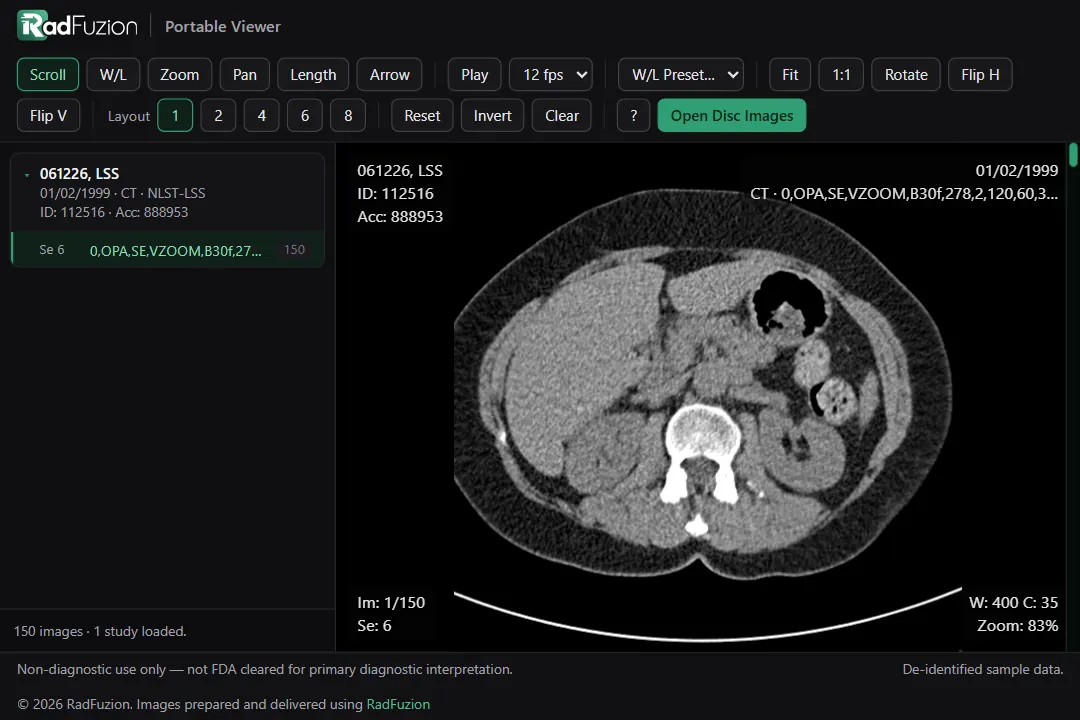 CT abdomen/pelvisopen_in_newTap to openfullscreenOpen the viewer full screen
Or pick a sample exam:
Each opens in a new tab. The viewer works on a phone, but it's at its best on a tablet or computer.
RadBurn
Included freeHow it gets on the disc
RadFuzion includes RadBurn, a lightweight companion app at no extra cost. It burns one or many exams to a CD, DVD, or Blu-ray and puts this viewer right on the disc. It shows the size and the right disc to use before you burn.
One-click disc burning
Burn one or many exams to CD, DVD, or Blu-ray with a standard DICOMDIR for import into PACS. Enhanced MR and CT are converted to classic images so older systems can read them.
A viewer on every disc
Patients double-click to open it on Windows, or open the HTML viewer on a Mac — nothing to install. Images load into memory only, so no patient data is left behind on the computer.
Built for patients & referrers
The disc auto-loads the exam with window/level, zoom, and measurements for non-diagnostic review.
Free with RadFuzion
No add-on license — RadBurn just comes with the platform.
RadBurn installs on the workstation with the disc drive. It's on the Downloads page.
See RadBurn and both viewers
Book a walkthrough and get pricing for your environment.
mailRequest a demo